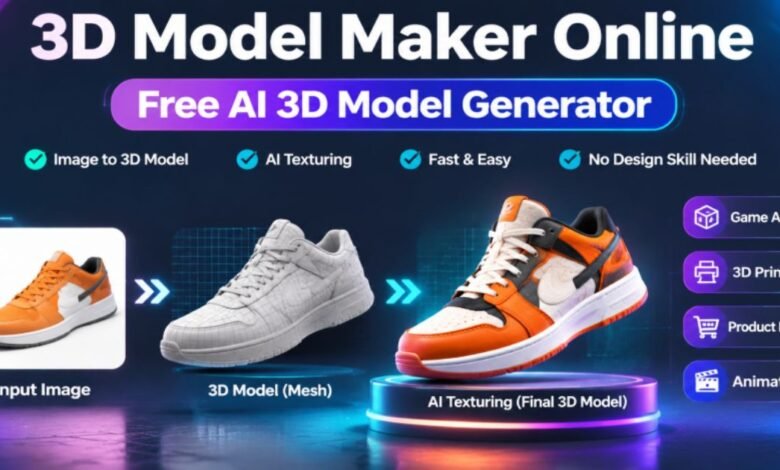
Creating professional 3D models no longer requires years of modeling experience or expensive software. Artificial intelligence has made 3D design more accessible, allowing beginners, designers, artists, and developers to transform simple ideas and images into detailed three-dimensional assets. Whether you want to create a character, product prototype, collectible figure, or game asset, a 3D model maker online can help you turn your creative ideas into reality.
Traditional 3D modeling often involves complicated software, manual sculpting, mesh editing, and time-consuming texturing. AI-powered tools simplify these processes by automating many of the technical steps. With the help of a 3d model maker online, users can explore a faster approach to 3D creation, generate models from reference images, and prepare digital assets for different creative applications.
What Is an Online 3D Model Maker?
An online 3D model maker is a web-based tool that allows users to create three-dimensional objects without installing complex desktop applications. Instead of manually building every shape and surface, users can work with reference images, descriptions, or other supported inputs to generate 3D assets.
Modern AI-powered 3D tools take this process further by analyzing visual information and reconstructing objects with depth, geometry, and surface details.
For example, you can start with a photograph of a product, an illustration of a fictional character, or a concept design. The AI system processes the visual information and generates a three-dimensional representation that can be reviewed and refined.
This technology is particularly useful for:
- Beginners exploring 3D design for the first time.
- Digital artists creating characters and creative assets.
- Game developers building environments and objects.
- Product designers developing visual prototypes.
- 3D printing enthusiasts creating physical objects.
- E-commerce businesses producing three-dimensional product visuals.
How Does a Free AI 3D Model Generator Work?
A free AI 3D model generator uses artificial intelligence to interpret visual or textual information and convert it into a three-dimensional structure.
Although the exact technology varies between platforms, the general workflow involves several important stages.
1. Upload an Image or Provide a Reference
The first step is providing the AI with a visual reference. This could be a product photograph, character illustration, animal picture, or another suitable image.
A clear image with good lighting and a visible subject generally provides a better starting point. If you have multiple views of an object, they can help the system understand its shape and structure more accurately.
2. AI-Based 3D Reconstruction
After receiving the reference, the AI analyzes the object’s visual characteristics, including its shape, proportions, contours, and visible details.
It then generates a three-dimensional structure with depth and geometry. Depending on the platform and generation settings, the resulting model may include additional details that are not directly visible in the original image.
3. Apply Textures and Surface Details
A 3D model needs more than geometry to look realistic. Its appearance also depends on colors, materials, surface patterns, and lighting-related properties.
AI texturing helps add these visual details, making generated objects look more natural and visually appealing.
For example, a character model can receive realistic skin, hair, clothing, and material details, while a product model can feature metallic, plastic, wooden, or other surface appearances.
4. Review and Export the Model
Once the model is generated, users can inspect its shape and appearance before exporting it.
Depending on the platform, supported export formats may include GLB, OBJ, FBX, STL, and USDZ. These formats allow creators to continue working with their models in compatible 3D applications, visualization tools, and printing workflows.
Why Choose an AI-Powered 3D Model Maker Online?
AI-powered 3D creation offers several advantages over traditional modeling workflows.
Faster 3D Creation
Traditional modeling can require hours of manual work, particularly when creating detailed characters or complex objects. AI automation can significantly reduce the initial modeling effort, allowing creators to focus more on improving their ideas.
No Advanced Modeling Experience Required
Beginners often find professional 3D software difficult because of its complex interfaces and technical features. An online AI tool provides a more approachable starting point, allowing users to experiment with 3D creation without mastering every modeling technique.
More Creative Possibilities
AI tools make it easier to experiment with different designs, shapes, and visual concepts. Artists can explore new ideas, create alternative versions, and develop creative assets without rebuilding every object manually.
Convenient Browser-Based Access
An online platform makes 3D creation more convenient because users can access supported features through a web browser. This reduces the need to install and configure multiple applications just to begin creating a model.
Explore Hi3D: A Practical Platform for AI 3D Creation
If you are looking for an accessible way to experiment with AI-powered 3D design, Hi3D is worth exploring. It brings several 3D creation capabilities together in one platform, helping users move from reference images to usable digital assets.
Hi3D supports image-to-3D generation, AI texturing, multi-view generation, 3D relief creation, model splitting, and multi-color printing workflows.
Its 3D model creation process is particularly useful for people who want to transform existing visual references into three-dimensional objects without starting from an empty modeling workspace.
You can explore the free AI 3D model generator to discover its available tools and experiment with creating your own 3D assets.
The platform also provides multiple export options, including GLB, OBJ, FBX, STL, and USDZ, depending on the selected workflow. This makes it possible to continue refining generated assets in compatible third-party applications.
Where Can You Use AI-Generated 3D Models?
The applications of AI-generated 3D models extend across several industries.
Game Development
Game developers can use AI-generated models as starting points for characters, props, objects, and environmental elements. These assets can help accelerate early development and creative experimentation.
However, additional optimization, retopology, and rigging may be necessary before using models in a production-ready game.
3D Printing
One of the most exciting applications is converting digital concepts into physical objects.
Users can create figurines, personalized gifts, decorative items, and collectible models. With suitable geometry and file preparation, these models can be exported into compatible formats such as STL for further processing in slicing software.
Product Design and E-Commerce
Businesses can use 3D models to develop product concepts, create digital presentations, and improve product visualization.
For example, designers can turn reference images of accessories, furniture, and decorative products into three-dimensional assets for further refinement.
Animation and Digital Art
Artists and animators can use AI-generated models as starting points for creative projects. Characters, props, and other objects can be refined in professional software before being incorporated into animations or visual productions.
Architecture and Interior Visualization
AI-generated objects can also support architectural visualization workflows. Furniture, decorative elements, and other visual assets can be used as references or starting points for more detailed scene development.
Tips for Getting Better Results from an AI 3D Model Generator
Although AI simplifies the creation process, the quality of the input still matters. Consider these practical tips:
- Use high-quality reference images: Clear images help AI understand the subject’s visible structure and details.
- Choose simple backgrounds: Avoid unnecessary objects that may confuse the generation process.
- Show the complete subject: Make sure important parts are not cropped or hidden.
- Use multiple viewing angles: When supported, additional views can improve the reconstruction of hidden surfaces.
- Check the generated geometry: Inspect the model for missing details, unusual shapes, or structural problems.
- Choose suitable export formats: Consider whether your model is intended for animation, visualization, editing, or 3D printing.
Remember that AI-generated models may still require manual adjustments. A visually impressive model is not automatically optimized for every production workflow.
Final Thoughts
AI is changing how people approach 3D design by making the creation process faster and more accessible. A modern 3D model maker online can help beginners and experienced creators transform visual references into detailed three-dimensional assets without building every component manually.
Whether you are interested in game development, product visualization, digital art, or 3D printing, a free AI 3D model generator provides an opportunity to experiment with new creative possibilities.
Platforms such as Hi3D bring image-to-3D generation, AI texturing, and additional modeling tools together to simplify the journey from an initial idea to a usable 3D asset. With the right reference images and some creative experimentation, you can explore a new approach to digital design and bring more of your ideas into three dimensions.
Read more articles from IPHLPSVC