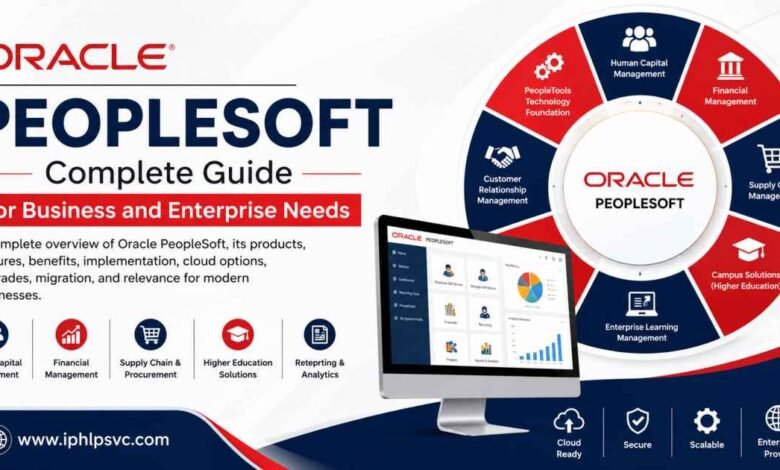
Oracle PeopleSoft is an enterprise application platform used by organizations to manage key business operations, including human resources, payroll, finance, procurement, supply chain, projects, assets, and higher education administration.
PeopleSoft has been part of the enterprise software landscape for decades, yet it remains relevant for organizations that depend on complex business processes and highly configurable applications. Oracle continues to develop the platform, release updates, improve user experiences, support modern integrations, and provide cloud deployment options.
This guide explains oracle peoplesoft in simple terms and covers what PeopleSoft is, what it is used for, its major products, benefits, implementation options, cloud strategies, maintenance, modernization, and the differences between PeopleSoft and Oracle Fusion Cloud.
What Is Oracle PeopleSoft?
What is PeopleSoft?
Oracle PeopleSoft is a suite of enterprise applications that helps organizations manage large and complicated business operations.
The platform is commonly associated with Human Capital Management and enterprise financial management, but its capabilities extend into supply chain management, higher education, learning, customer relationship processes, reporting, and other areas.
For someone asking what PeopleSoft is, the simplest explanation is this:
PeopleSoft is enterprise business software that helps an organization manage employees, finances, purchasing, projects, assets, students, and other important operational information.
PeopleSoft is built on a technology foundation called PeopleTools. PeopleTools provides many of the technical capabilities needed to configure, develop, integrate, secure, test, and administer PeopleSoft applications.
Why organizations use PeopleSoft
PeopleSoft can be valuable when an organization has complex processes that cannot be easily handled by a simple business application.
Common reasons for using PeopleSoft include:
- Complex human resources administration
• Payroll and benefits management
• Employee and manager self-service
• Financial accounting
• Procurement
• Supply chain management
• Project management
• Asset management
• Higher education administration
• Enterprise reporting
• Integration with other business systems
What Is Oracle PeopleSoft Used For?
PeopleSoft supports many of the core processes needed by large organizations.
1. Human Capital Management
PeopleSoft HCM is used for managing employee-related activities throughout the employment lifecycle.
Typical functions include:
- Employee records
• Organizational management
• Payroll
• Benefits administration
• Time management
• Absence management
• Recruiting
• Talent management
• Workforce administration
• Employee self-service
• Manager self-service
HCM is one of the most recognized areas of the PeopleSoft product family.
2. Financial management
PeopleSoft Financials and Supply Chain Management supports many financial and operational processes.
Common uses include:
- General ledger
• Accounts payable
• Accounts receivable
• Asset management
• Purchasing
• Billing
• Project costing
• Contracts
• Inventory
• Supplier management
This makes PeopleSoft useful for organizations that need detailed control over financial transactions and operational processes.
3. Procurement and supply chain
PeopleSoft can support purchasing and supply chain activities from requisition creation through approvals, purchasing, receiving, and related financial processes.
The system can help organizations standardize procurement procedures while maintaining control over purchasing policies and approvals.
4. Higher education administration
PeopleSoft is also widely associated with colleges and universities.
PeopleSoft Campus Solutions can support areas such as:
- Student records
• Admissions
• Enrollment
• Academic advising
• Student financial information
• Campus administration
• Graduation processes
This specialized functionality is one reason PeopleSoft remains important in higher education.
5. Enterprise learning
PeopleSoft can also support employee learning and training administration.
Organizations can manage courses, learning activities, employee training information, and related administrative tasks.
6. Reporting and analytics
Enterprise organizations create large amounts of business information. PeopleSoft provides reporting and analytical capabilities that can help users understand financial, employee, operational, and organizational data.
Oracle PeopleSoft Products and Key Features
PeopleSoft includes several application families designed for different areas of enterprise operations.
| PeopleSoft product area | Main purpose | Typical users |
| Human Capital Management | Human resources, payroll, benefits, workforce management | HR teams, managers, employees |
| Financials and Supply Chain Management | Finance, purchasing, assets, projects, supply chain | Finance and operations teams |
| Campus Solutions | Student and higher education administration | Colleges and universities |
| Customer Relationship Management | Customer and service-related processes | Customer and service teams |
| Enterprise Learning Management | Training and learning administration | HR and learning teams |
| Enterprise Performance Management | Analysis, planning, and performance information | Executives and analysts |
| Interaction Hub | Access to business information and services | Employees and managers |
| PeopleTools | Development, administration, security, integration, and testing | IT teams and developers |
1. PeopleTools
PeopleTools is the technology foundation behind PeopleSoft.
It provides capabilities for:
- Application development
• Configuration
• Security
• Integration
• Testing
• Administration
• Deployment
• User interface development
PeopleTools is important because PeopleSoft is not simply a collection of business screens. It provides a technical environment for adapting applications to organizational requirements.
2. Fluid User Interface
PeopleSoft’s Fluid User Interface provides a responsive experience designed for different screen sizes.
Employees and managers can access many business functions through modern browser-based interfaces using computers, tablets, and mobile devices.
This can improve accessibility and reduce dependence on older-style application interfaces.
3. Integration capabilities
Modern businesses rarely operate with one application.
PeopleSoft can integrate with other systems using APIs and other integration technologies. This can enable information to flow between PeopleSoft and systems used for banking, identity management, payroll services, government reporting, data warehousing, analytics, and other business applications.
Benefits of Oracle PeopleSoft for Businesses
1. Deep business functionality
One of PeopleSoft’s biggest strengths is its depth.
Organizations with detailed policies and complicated operating structures can configure many parts of the system to match business requirements.
2. Extensive configuration
PeopleSoft provides significant configuration flexibility.
This can be useful when business rules differ between departments, locations, employee groups, or legal entities.
3. Broad enterprise coverage
A PeopleSoft environment can support several major business functions.
This may allow an organization to connect HR, finance, purchasing, projects, assets, learning, and other processes within an established enterprise environment.
4. Mature security
Enterprise applications must protect sensitive information.
PeopleSoft provides security functionality for controlling access to applications, business processes, roles, users, and data.
5. Integration flexibility
PeopleSoft can work with external systems, which is especially important for large organizations with extensive technology environments.
6. Long-term value
Organizations that have invested heavily in PeopleSoft may have years of process knowledge, configuration, integrations, reports, data, and employee experience built around the platform.
Replacing such an environment can therefore be much more complicated than simply purchasing new software.
Oracle PeopleSoft Implementation and Integration
A PeopleSoft implementation should begin with business requirements rather than technology alone.
1. Understand business processes
Before configuration begins, an organization should understand:
- How current processes work
• Which processes are mandatory
• Where approvals occur
• Which data is required
• Which reports are important
• Which integrations are essential
• Which security rules apply
This creates a stronger foundation for the implementation.
2. Configuration
Configuration changes the way standard PeopleSoft functionality operates without necessarily creating significant custom code.
A configuration-first approach can make future maintenance easier.
3. Customization
Some organizations need functionality that is not available through standard configuration.
Customization can address unique business requirements, but excessive customization may make upgrades, testing, troubleshooting, and modernization more difficult.
A well-managed environment documents the reasons for each significant customization.
4. Integration
PeopleSoft often operates as part of a larger technology ecosystem.
Important integration areas can include:
- Payroll services
• Financial institutions
• Identity and authentication systems
• Government systems
• Data warehouses
• Business intelligence platforms
• Third-party business applications
5. Testing
Testing is essential for enterprise software because a small system change can affect payroll, financial transactions, security, reporting, or integrations.
Testing should cover:
- Business processes
• Security
• Integrations
• Reports
• Performance
• Data
• User experience
Automated testing can reduce repetitive manual work during maintenance and upgrade activities.
Oracle PeopleSoft Cloud and Deployment Options
PeopleSoft can be deployed in multiple ways.
1. On-premises deployment
With an on-premises model, the organization operates the infrastructure needed to run PeopleSoft.
This can provide extensive control, but internal technology teams may be responsible for:
- Servers
• Storage
• Operating systems
• Database infrastructure
• Backups
• Disaster recovery
• Monitoring
• Capacity planning
• System maintenance
2. PeopleSoft on Oracle Cloud Infrastructure
Organizations can run PeopleSoft on Oracle Cloud Infrastructure.
This approach can move infrastructure operations toward the cloud while allowing the organization to continue using PeopleSoft applications and established business processes.
For organizations that do not want an immediate application replacement, cloud infrastructure can provide a practical step toward modernization.
3. Hybrid deployment
A hybrid strategy can combine cloud and traditional infrastructure.
This approach can be useful when different applications have different technical requirements or when an organization needs to modernize gradually.
Deployment comparison
| Deployment approach | Main advantage | Main consideration |
| On premises | Strong infrastructure control | Greater internal operational responsibility |
| PeopleSoft on cloud infrastructure | Cloud infrastructure with PeopleSoft continuity | Requires cloud architecture and management |
| Hybrid | Gradual modernization | More complex environment |
| Oracle Fusion Cloud | Fully managed SaaS model | Often requires greater business transformation |
Oracle PeopleSoft Upgrades and Maintenance
PeopleSoft should not be treated as a system that only needs attention every few years.
Regular maintenance can improve security, compatibility, reliability, and long-term stability.
Why upgrades matter
Regular updates can address:
- Security requirements
• Regulatory changes
• Software defects
• New functionality
• Browser compatibility
• Database compatibility
• Technology changes
• Performance improvements
PeopleSoft Update Manager
PeopleSoft uses tools that help organizations identify and apply relevant updates.
A structured maintenance strategy can enable an organization to select necessary changes rather than treating each maintenance cycle as an entirely new implementation.
Testing during maintenance
Every important update should be evaluated for its impact on business processes.
A strong maintenance process normally includes:
- Review the update
- Identify impacted processes
- Apply the change to a test environment
- Run functional tests
- Test critical integrations
- Validate security
- Review reports
- Move the update into production after approval
Regular maintenance can also reduce the technical debt that develops when an environment remains unchanged for too long.
Oracle PeopleSoft vs Oracle Fusion Cloud
PeopleSoft and Oracle Fusion Cloud serve similar, broad enterprise needs, but their technologies and operating models differ.
PeopleSoft
PeopleSoft is generally attractive to organizations that value:
- Deep functional capabilities
• Extensive configuration
• Established business processes
• Large existing investments
• Complex integrations
• Significant customization
Oracle Fusion Cloud
Oracle Fusion Cloud is designed around a modern SaaS model.
The platform emphasizes cloud-based applications, standardized processes, continuous updates, embedded analytics, and modern technology.
Key comparison
| Area | PeopleSoft | Oracle Fusion Cloud |
| Application model | Enterprise application platform | SaaS application suite |
| Deployment | On premises or cloud infrastructure | Oracle managed cloud |
| Customization | Extensive | More controlled |
| Updates | Customer-managed activities | Continuous vendor-managed updates |
| Infrastructure | Depends on deployment | Managed by Oracle |
| Existing PeopleSoft investment | Strong advantage | Requires transformation |
| Best fit | Complex established environments | Cloud transformation strategies |
The choice should not be based only on which platform is newer.
A mature PeopleSoft environment can continue to provide substantial value when its business processes, integrations, data, and customizations remain important.
Oracle PeopleSoft Migration and Modernization
Modernization does not always mean replacing PeopleSoft immediately.
Several strategies are possible.
1. Stay on PeopleSoft and optimize
An organization can continue using PeopleSoft while improving:
- User experience
• Integration
• Reporting
• Security
• Testing
• Automation
• Infrastructure
• Upgrade processes
This may provide significant improvements without the risk of a large replacement program.
2. Move PeopleSoft infrastructure to the cloud
Moving an existing PeopleSoft environment to cloud infrastructure can modernize the technology layer while preserving many existing applications and processes.
This approach can be attractive when the organization wants cloud infrastructure but is not ready for a complete application transformation.
3. Modernize in phases
A phased modernization strategy can examine individual business areas rather than replacing everything simultaneously.
For example, an organization may evaluate HR, finance, procurement, or student administration separately.
4. Move to Oracle Fusion Cloud
A complete move to Fusion Cloud may be appropriate for an organization seeking a SaaS first operating model.
However, migration can affect:
- Business processes
• Data structures
• Integrations
• Reports
• Security
• Customizations
• User roles
• Training
• Change management
For that reason, a PeopleSoft-to-Fusion migration should be treated as a business transformation rather than simply a technical upgrade.
Is Oracle PeopleSoft Still Relevant?
Yes, oracle peoplesoft remains relevant for many organizations.
The important question is not whether PeopleSoft is old. The more useful question is whether the platform continues to meet the organization’s operational, technical, financial, and strategic requirements.
PeopleSoft can remain a strong option when:
- Existing business processes work well
• Custom functionality is important
• Integrations are extensive
• The organization has experienced PeopleSoft staff
• Regulatory requirements are complicated
• Replacing the system would create significant disruption
• The existing environment is properly maintained
Modernization may become more attractive when:
- Technical debt is increasing
• Infrastructure costs are difficult to manage
• Customizations have become too complex
• Users need more modern digital experiences
• Integration architecture needs major improvement
• The organization has adopted a cloud-first strategy
• Business leadership wants standardized SaaS processes
Oracle’s continued investment in PeopleSoft also matters when evaluating the platform’s future.
PeopleSoft is not simply a frozen legacy product. The ecosystem continues to receive application updates, technology improvements, cloud options, and lifecycle support.
Oracle PeopleSoft Frequently Asked Questions
What is PeopleSoft in simple terms?
PeopleSoft is enterprise software used to manage key organizational processes, including human resources, payroll, finance, procurement, projects, supply chain operations, and higher education administration.
What is Oracle PeopleSoft used for?
Oracle PeopleSoft is used for HR management, payroll, benefits, financial management, procurement, supply chain processes, project management, asset management, learning, reporting, and higher education administration.
Is PeopleSoft an ERP?
PeopleSoft offers comprehensive ERP capabilities, particularly in financial and supply chain applications. However, PeopleSoft is broader than a traditional ERP because it also includes HCM, higher education, learning, and other enterprise applications.
What is MCCS PeopleSoft?
MCCS PeopleSoft refers to PeopleSoft-related systems used within Marine Corps Community Services environments. PeopleSoft can support employee and personnel activities, including access to employment-related information and business processes.
Is PeopleSoft still supported?
Yes. PeopleSoft continues to receive product development, updates, technology improvements, and ongoing support. Organizations should still maintain supported versions of applications and technologies.
Can PeopleSoft run in the cloud?
Yes. PeopleSoft can operate on cloud infrastructure, including Oracle Cloud Infrastructure. Organizations can choose a cloud strategy while continuing to use PeopleSoft applications.
Is PeopleSoft the same as Oracle Fusion Cloud?
No. PeopleSoft and Oracle Fusion Cloud are separate enterprise application platforms with different architectures, deployment models, customization approaches, and lifecycle strategies.
Is PeopleSoft outdated?
It is more accurate to describe PeopleSoft as a mature enterprise platform rather than simply an outdated system. Its value depends on business requirements, system health, maintenance, integrations, and the organization’s future technology strategy.
Should a business migrate from PeopleSoft to Fusion?
Not automatically.
A business should compare the current PeopleSoft value with the goals of a potential Fusion transformation. Cost, business process fit, customization, integrations, data, security, user experience, technical debt, and long-term strategy should all be considered.
Final Thoughts on Oracle PeopleSoft
Oracle PeopleSoft continues to play an important role in enterprise technology because many organizations depend on its mature business functionality, extensive configuration capabilities, complex workflows, and established integrations.
PeopleSoft can support critical functions across human resources, payroll, finance, procurement, supply chain operations, projects, assets, higher education, and learning.
Modernization does not require an immediate replacement.
An organization can continue with PeopleSoft, improve its existing environment, strengthen integrations, modernize infrastructure, adopt cloud deployment, automate testing, and improve user experiences. Another organization may determine that a transition to Oracle Fusion Cloud better matches its future strategy.
The strongest approach is to evaluate the business rather than follow a one-size-fits-all technology trend.
For people researching PeopleSoft, what is PeopleSoft, oracle peoplesoft, or MCCS PeopleSoft, the central idea is simple: PeopleSoft remains a mature enterprise platform with significant capabilities and multiple modernization paths.
I would evaluate business processes, system performance, customization, integration requirements, operating costs, security, user expectations, and long-term goals before making a major platform decision.
I would also treat modernization as a business decision, not simply a software decision.
A properly maintained PeopleSoft environment can continue to serve demanding organizations, while cloud infrastructure and modern integration options provide opportunities to improve the platform without immediately replacing everything.







2 Comments