Google Workspace ships with sensible defaults, but defaults are written for the average customer, not for any particular organization. Over time, small decisions accumulate: an admin approves a convenient third-party app, a team lead shares a folder with an outside agency, a departing executive’s mailbox keeps forwarding messages to a personal address. Each choice looks harmless in isolation. Together they form the exposure that attackers look for.
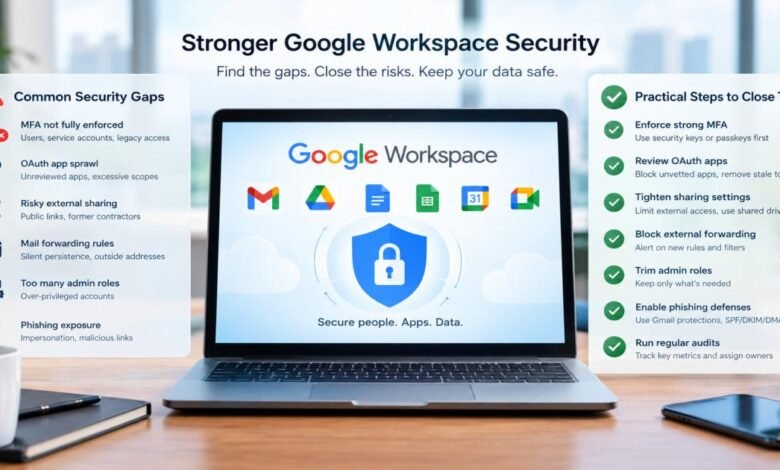
For IT administrators, the useful question is not whether gaps exist but which ones carry the most risk and how quickly they can be closed. Most of the issues below can be found with built-in reports and fixed with settings changes rather than new purchases. The sections that follow cover multi-factor authentication, OAuth sprawl, external sharing, forwarding rules, admin roles, and phishing exposure, in roughly the order that investigations tend to uncover them.
Where Multi-Factor Authentication Still Falls Short
Many organizations report that MFA is “enabled” when it is merely available. Users who never enrolled, service accounts that skip the prompt, and legacy protocols that bypass modern sign-in all leave doors open. The admin console’s security reporting shows enrollment by user, and the numbers are often lower than leadership assumes.
A short audit surfaces most of the problems:
- Users with no second factor enrolled
- Accounts relying only on SMS or voice codes
- Service and shared accounts exempt from enforcement
- Legacy sign-in methods that are still permitted
Method strength matters as much as coverage. SMS codes and push approvals can be defeated by SIM swapping and by attackers who spam prompts until a tired user taps “approve.” Security keys and passkeys resist phishing because they bind authentication to the genuine sign-in domain. A sensible policy requires phishing-resistant methods for administrators and finance staff first, then widens the requirement over time.
Recovery paths deserve a review too. If a help desk will reset a password after a convincing phone call, the strongest MFA in the world becomes irrelevant. Administrators should document how identity is verified before any reset and restrict who is allowed to perform one.
Taming OAuth App Sprawl While Protecting Google Workspace Accounts
Every time a user clicks “Sign in with Google” or grants an add-on access to Drive, an OAuth token is created. These tokens often outlive passwords, survive MFA resets, and give a third party standing access to mail, files, or calendars. A single careless approval by one employee can expose a great deal of data.
Practical steps for protecting Google Workspace accounts begin with visibility. The API controls section of the admin console lists connected apps and the scopes each has been granted. Administrators can switch from open consent to an allowlist, blocking unreviewed apps while letting vetted ones through. Scopes that read all mail or all Drive content should trigger the strongest scrutiny.
Cleanup is the second task. Apps that nobody has used in months, add-ons from vendors the company no longer works with, and tokens held by departed employees can all be revoked. A quarterly review keeps the list manageable. When the business insists on a new integration, administrators can ask what data it needs, who owns the relationship, and what happens to the token if that owner leaves.
Each revoked token also supports the broader goal of protecting Google Workspace accounts, since a stale grant stays usable long after the person who approved it has forgotten it exists. Reviewing newly requested apps weekly, even briefly, keeps the allowlist from turning into another forgotten list.
Risky External Sharing and Drive Exposure
Drive’s collaboration strengths create its biggest leak risk. Links set to “anyone with the link” travel far beyond their intended audience, through forwarded emails, chat threads, and browser history. Files shared years ago with a former contractor often remain accessible because nobody removed the permission.
The first control is the organization-wide sharing policy. Many teams restrict external sharing to approved domains, or require recipients to sign in with a Google account before opening a file. Shared drives help because ownership belongs to the team rather than an individual, so a departing employee does not take access decisions along with them.
Auditing comes next. The Drive audit log and security investigation tool can list publicly shared files, files shared with personal Gmail addresses, and documents with unusually broad editors. Sensitive material, such as HR records and customer exports, benefits from data loss prevention rules that warn or block when someone tries to share it outside the company. Expiry dates on external access turn a forgotten permission into a self-closing one.
Offboarding needs a sharing step too. Before an account is deleted, ownership of its Drive files should move to a manager or a shared drive, otherwise the content becomes orphaned and hard to audit. Shared drive membership deserves the same scrutiny, because a drive with dozens of members and no named manager tends to drift into broad access.
Mail Forwarding Rules and Silent Persistence
Attackers who compromise a mailbox rarely stay on the login page. They create a forwarding rule or filter that copies incoming mail to an outside address, sometimes hiding messages about invoices or password resets so the victim notices nothing. The rule keeps working after the password is changed, which is why incident responders always check for it.
Administrators can restrict automatic forwarding to external domains at the organization level, and they can alert on new forwarding addresses or filters created through the admin console. Gmail’s routing and compliance settings also allow domain-wide controls, though changes should be tested because some departments forward mail legitimately, for example to a ticketing system.
A periodic sweep adds safety. Reports of users with active forwarding, delegated mailbox access, or unusual filters take little time to review. Offboarding procedures should explicitly include removing forwarding and delegation, since departed employees’ mailboxes are a favorite target when nobody is watching them.
Reporting rules built on audit events can notify the security team when a new external forwarding address appears, which turns silent persistence into a visible event. Responders should also check delegated access and active sign-in sessions during any account investigation.
Admin Role Hygiene and Phishing Exposure
Super administrator accounts are the keys to the whole tenant, yet many organizations have far more of them than they need. Two or three dedicated accounts, separate from daily-use identities and protected by hardware keys, make a sound target. Everyone else can receive delegated roles scoped to a task, such as user management or help desk support. Reviewing role assignments each quarter catches accounts that gained privileges for a project and never lost them.
Phishing remains the usual entry point to any of these gaps, so it deserves its own defenses. Gmail’s advanced protections for attachments and spoofing should be enabled and tuned. SPF, DKIM, and DMARC records stop outsiders from impersonating the company’s own domain. Users still need to recognize lures, and short simulated exercises followed by immediate feedback tend to build better judgment than annual slide presentations.
Reporting must be easy. A visible button for flagging suspicious messages, plus a quick response from the security team, teaches employees that speaking up is worthwhile. Fast reports from a single user often give administrators the warning they need to pull a malicious message from every other inbox before more clicks occur.
Emergency accounts need a documented procedure as well. Store their credentials offline, test them occasionally, and alert on any use, so a break-glass login never becomes an unwatched back door.
Key Takeaways
Closing Workspace gaps rarely requires dramatic projects. Enroll everyone in strong MFA, starting with privileged users. Replace open OAuth consent with a reviewed allowlist. Tighten sharing defaults, block external forwarding, trim administrator roles, and make reporting phishing effortless. Each of these steps removes an option that attackers rely on.
A simple scorecard helps. Track the share of users on phishing-resistant MFA, the count of super administrators, the number of unreviewed OAuth apps, and the external forwarding rules found each month. Four numbers, reviewed regularly, show whether the tenant is getting safer. Responsibility should be assigned by name, with one owner per area and a date for the next review.
Administrators who schedule a recurring review, even a short monthly one, tend to stay ahead of drift. Settings that were correct at deployment will not remain correct as teams grow, apps multiply, and staff turn over. Treating configuration as a living responsibility, not a one-time setup task, is the habit that keeps a Workspace tenant defensible.